Your meetings, understood with no bot. Your calls, on servers you run.
Lucid Meeting Hub records and understands the meetings you already hold in Teams, Zoom, Webex or Google Meet without a bot in the call, transcribes them on your own computer and keeps them in an encrypted vault. Its other half, Lucid Meet, gives your organization end-to-end encrypted chat, channels and calls on relays the organization runs itself, and since 0.99.0 keeps the calls going when a relay fails.
The product
What it looks like on your computer.
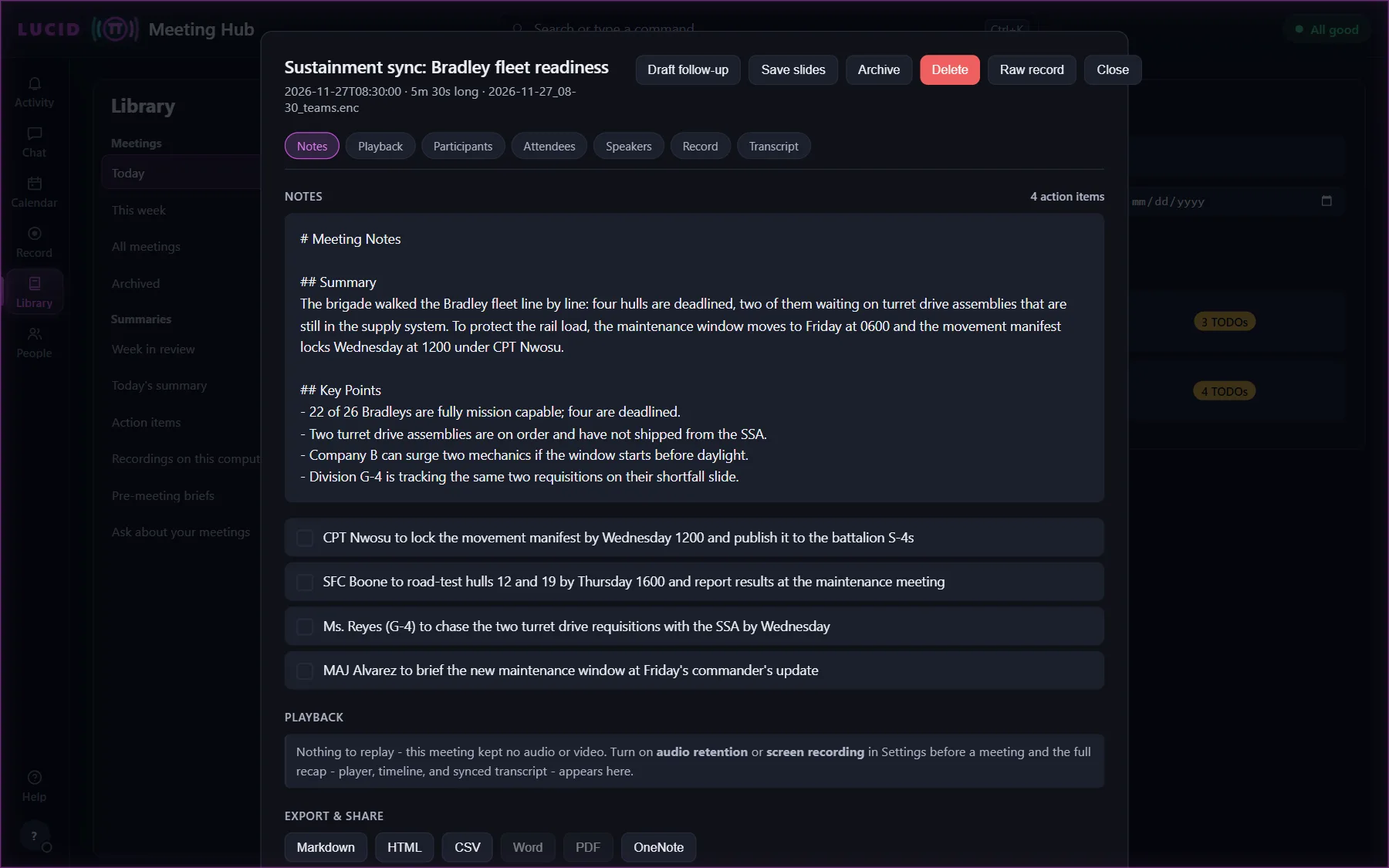
Screenshots of the running app. The Meeting Hub screens are the current build, taken on 2026-11-27 from the real dashboard over a vault of simulated meetings. No real person or meeting appears. Select a picture to see it full size.
Meeting Hub: capture, notes and answers Shipped
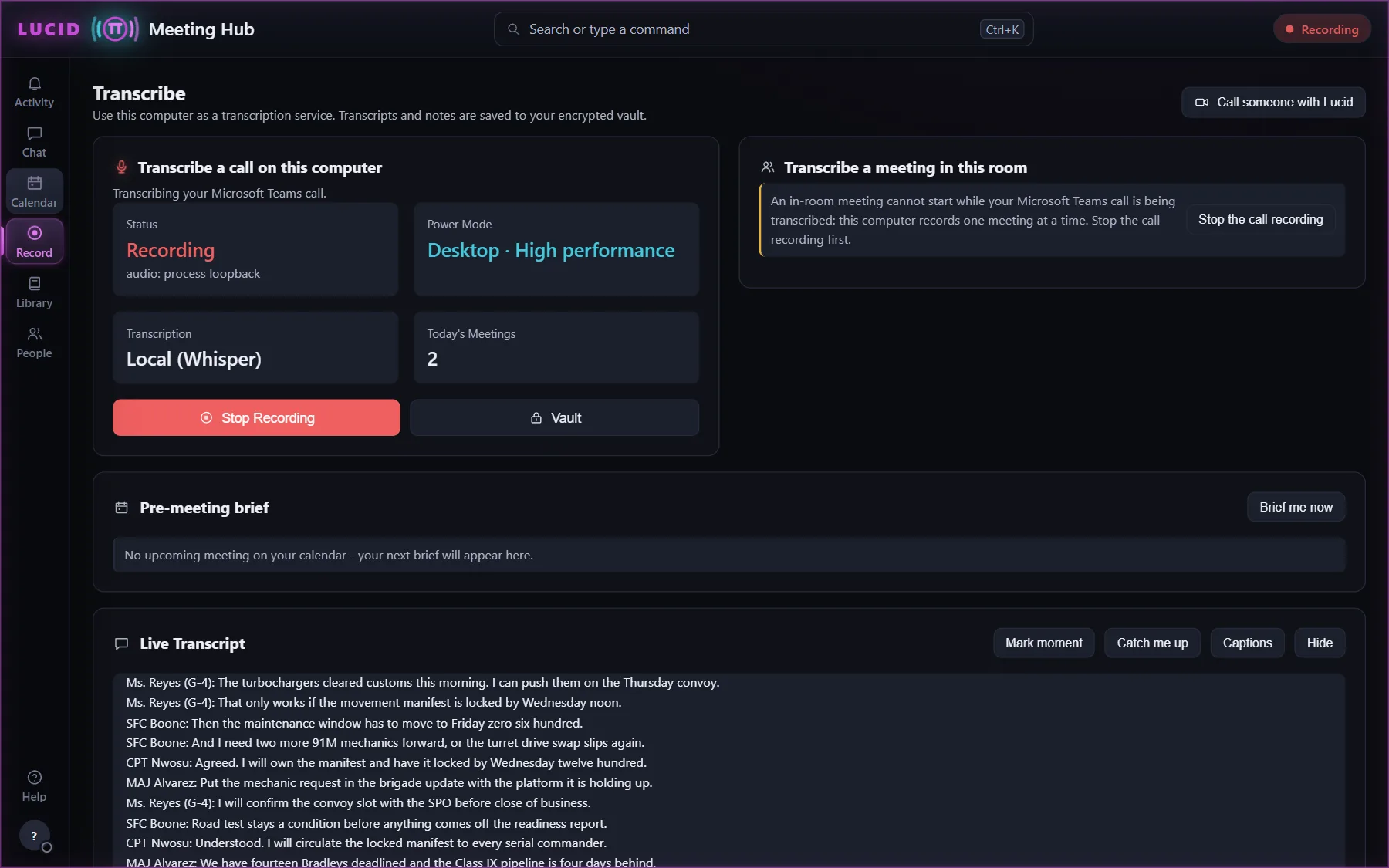
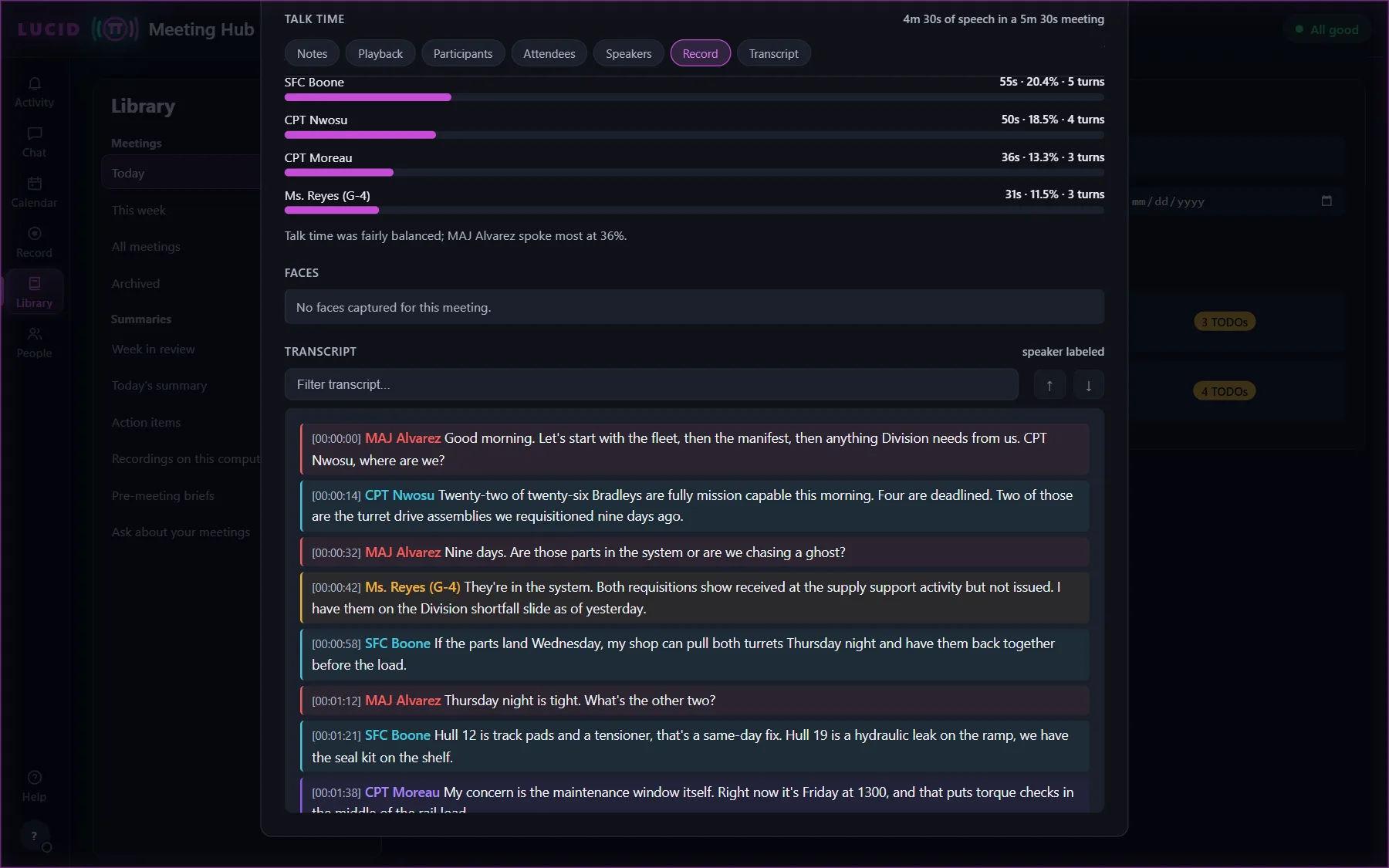
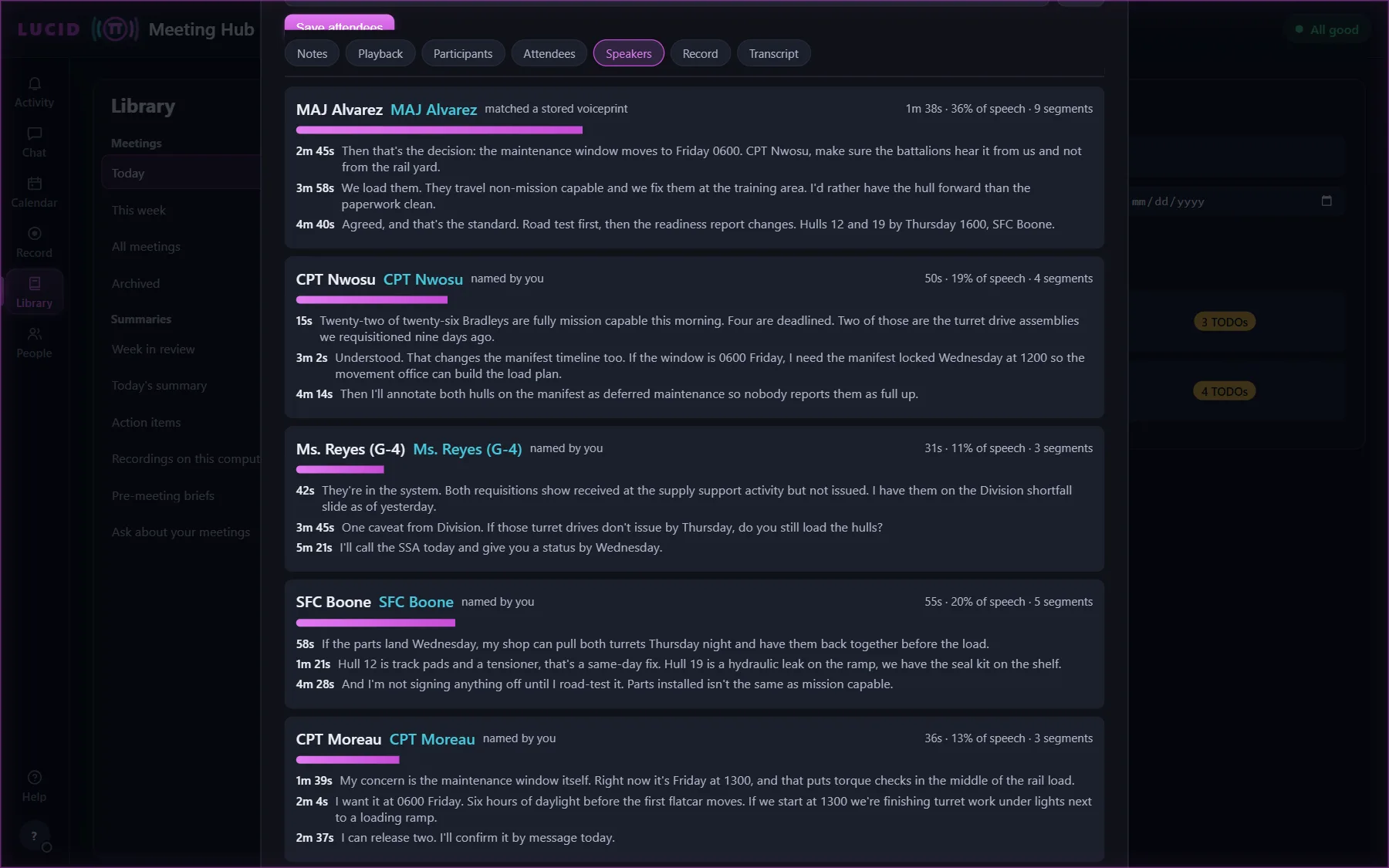
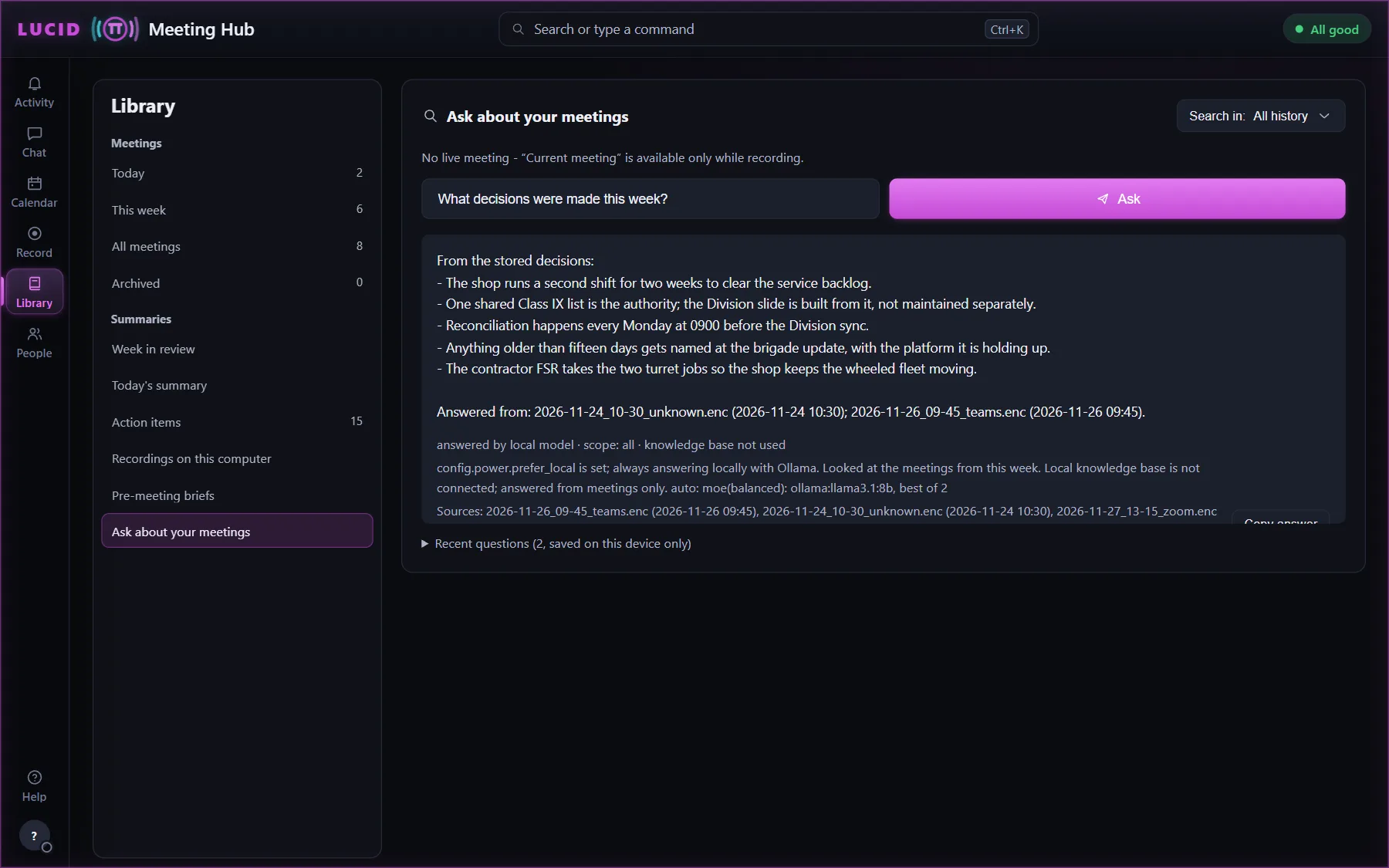
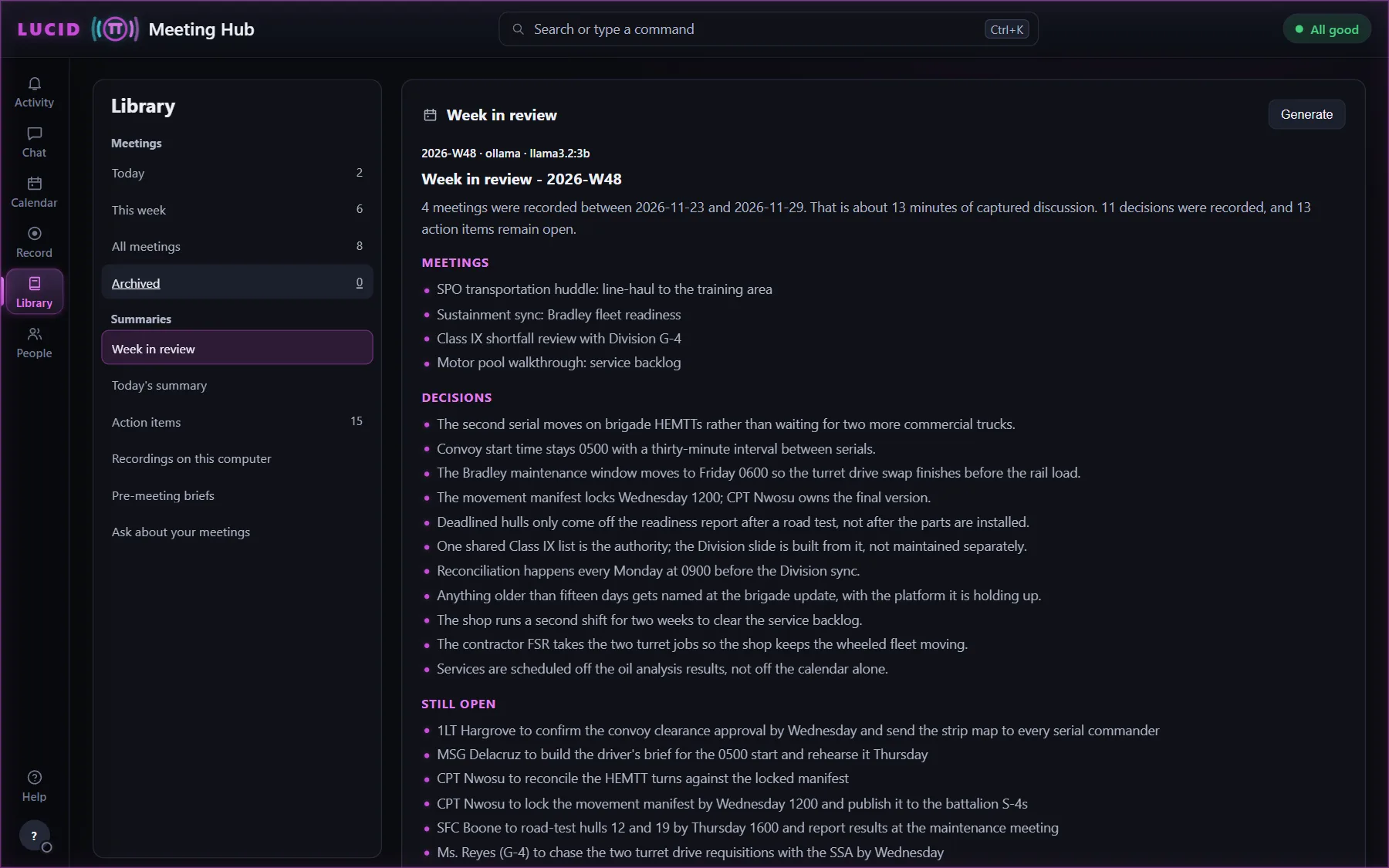
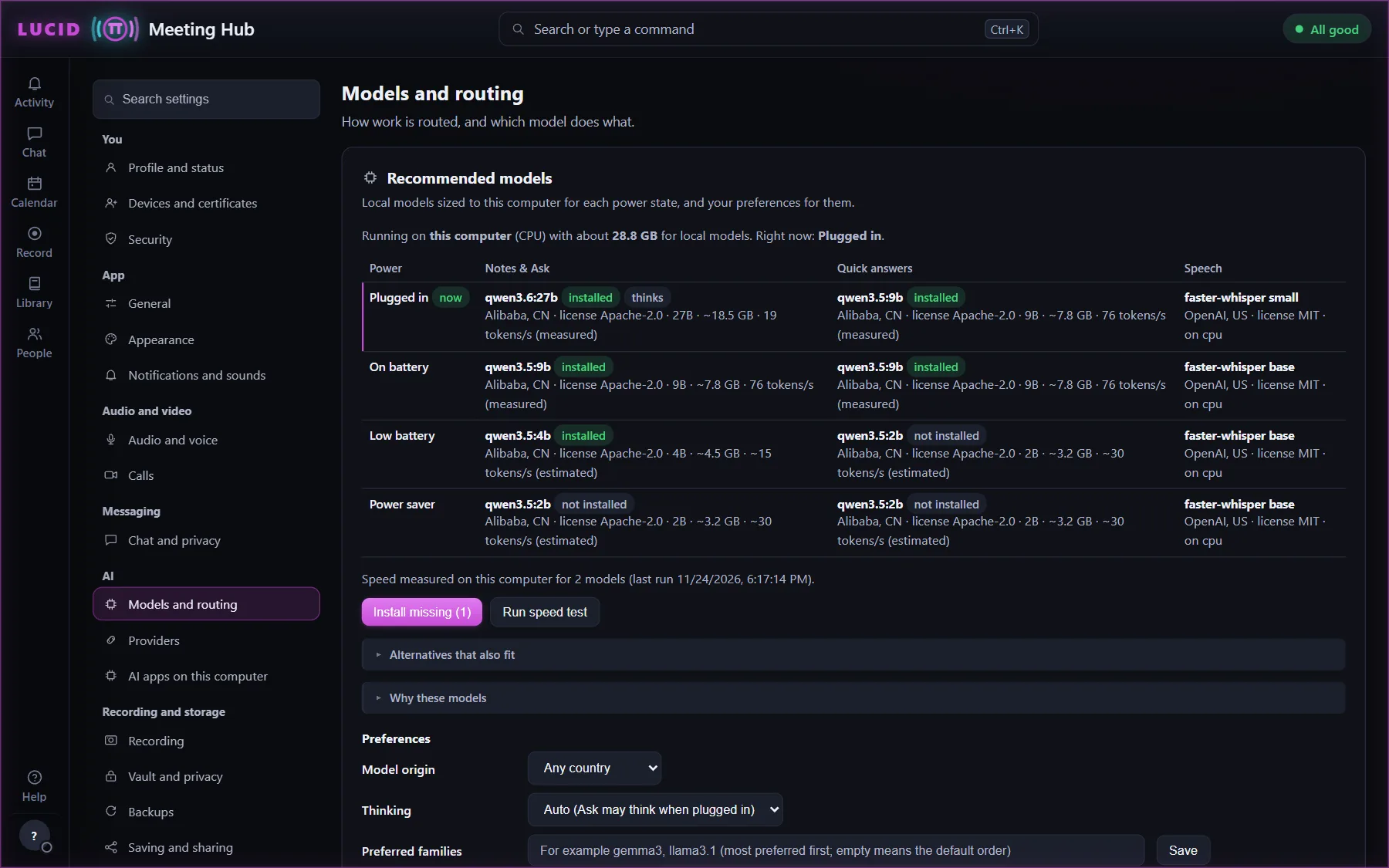
Lucid Meet chat, channels, files and calls are pictured in the next section.
Everything your team uses Teams for
Chat, channels, files and meetings, on servers you run.
Lucid Meet is the part of Meeting Hub that replaces a Teams workspace: a space for every team with its channels, group chats, files, shared documents and meetings. The difference is where it lives. It runs on your organization's own relays, conversations and files are end-to-end encrypted so the relay cannot read them, and the organization holds the keys. Everything below is in release 0.99.0 unless its label says otherwise.
A space for every team
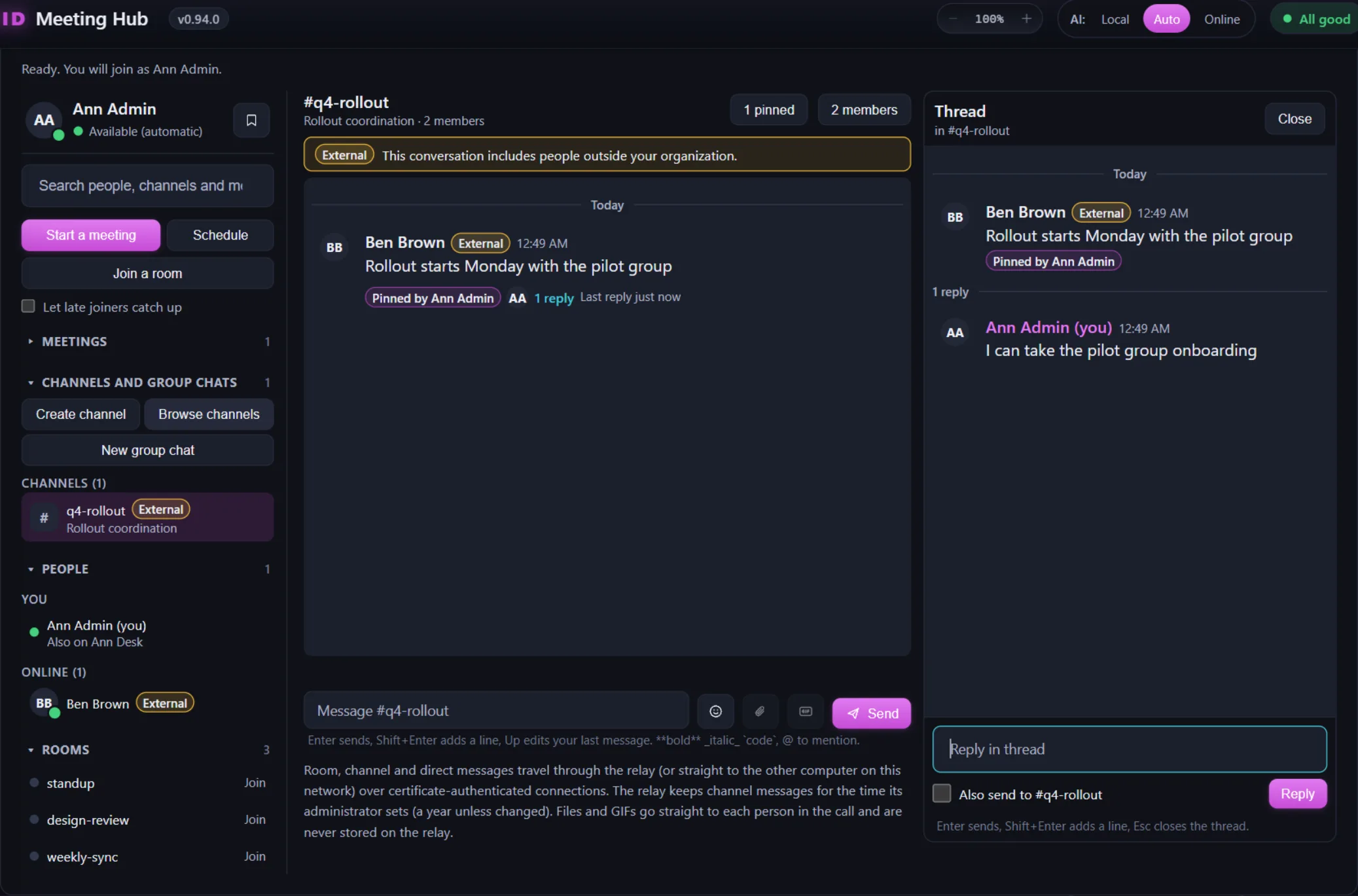
Public and private channels for each team or project (private ones are invisible to non-members), with owners and co-owners who manage members. Group chats and direct messages beside them. Threads, mentions, reactions, pins, saved items and search; per-conversation notifications; presence (Available, Busy, Do not disturb, Be right back, Away).
Share and keep files
Attach, drag or paste a file into any chat or channel. Each conversation has a Files panel with previews; only its members can download, executables carry a warning, and the person who shared a file can delete it. Uploads resume and are checked end to end. Files are encrypted with the conversation and kept as long as the organization's retention says; in a call, files up to 200 MB go straight to each person.
Shared documents
Canvases and lists: documents a channel or chat edits together, with headings, lists, checklists, links, mentions and tables, end-to-end encrypted like the messages. Also polls with live results and voice or video clips with a transcript.
Meetings like you are used to
Meet now or schedule a meeting with invitations people accept or decline, and a calendar view. In the call: screen sharing, raise hand, reactions, captions, a whiteboard, breakout rooms (2 to 20), polls, remote control with permission, a lobby for guests, large calls through the media server, team camera backgrounds, and recording only when everyone consents. Organizers get an attendance report.
Save meeting files where you work
Recordings, notes and exports go to the folder the organization chooses: on the computer, a network share, or the folder of a sync app such as OneDrive, Google Drive or Dropbox. If the destination is away, files wait in a holding area and retry.
Admin, compliance and apps
The Lucid Admin Console for people, devices and seats; sign-in with your identity provider (OIDC, SAML) and SCIM provisioning; retention, legal hold and an eDiscovery archive; incoming webhooks, apps and bots through the organization's connector, and workflows built in Settings.
What it looks like
Screenshots from live test runs on the 0.94 and 0.95 builds with simulated people. The features are the same in 0.99.0; the window around them has since moved to the app bar shown above.
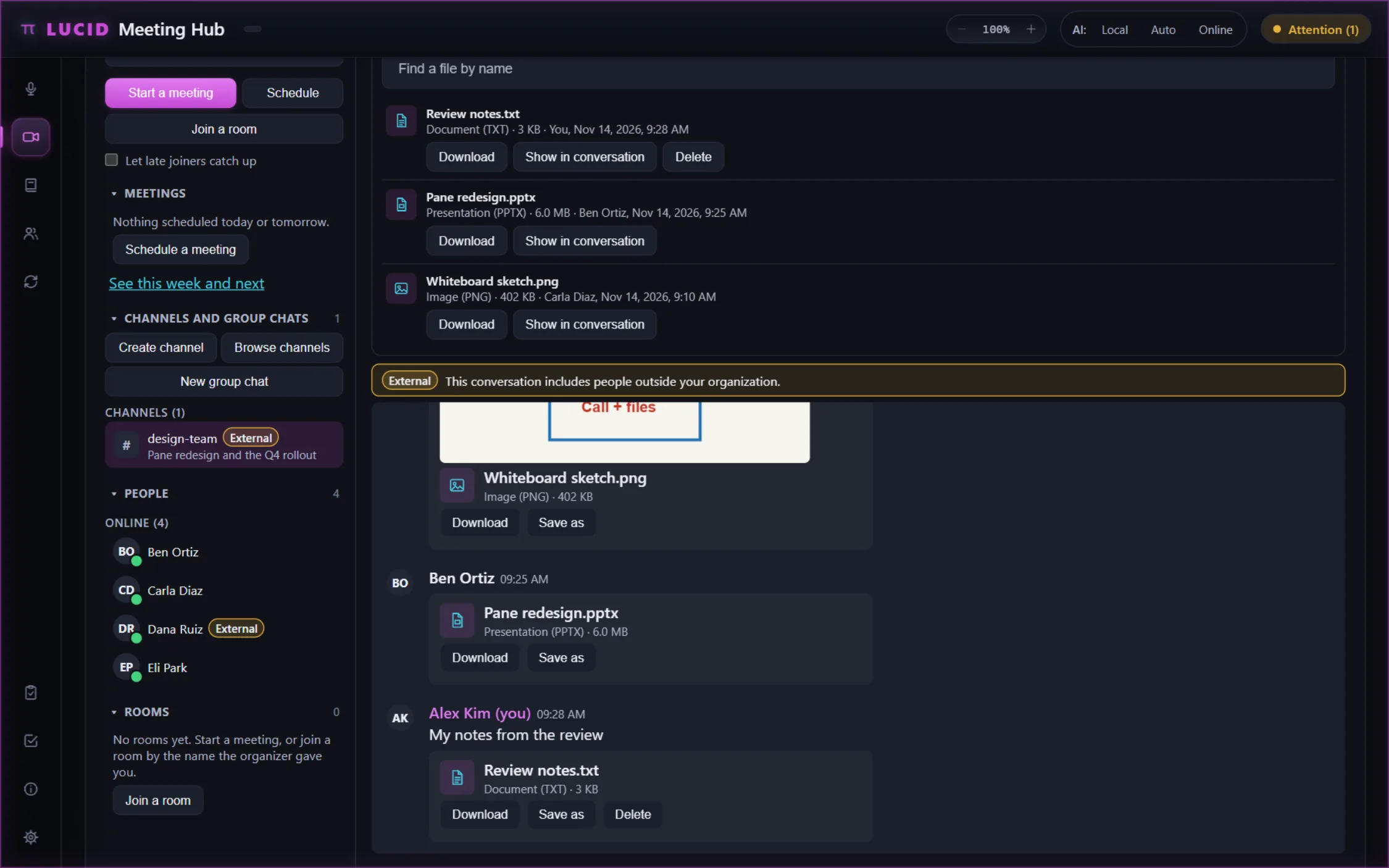
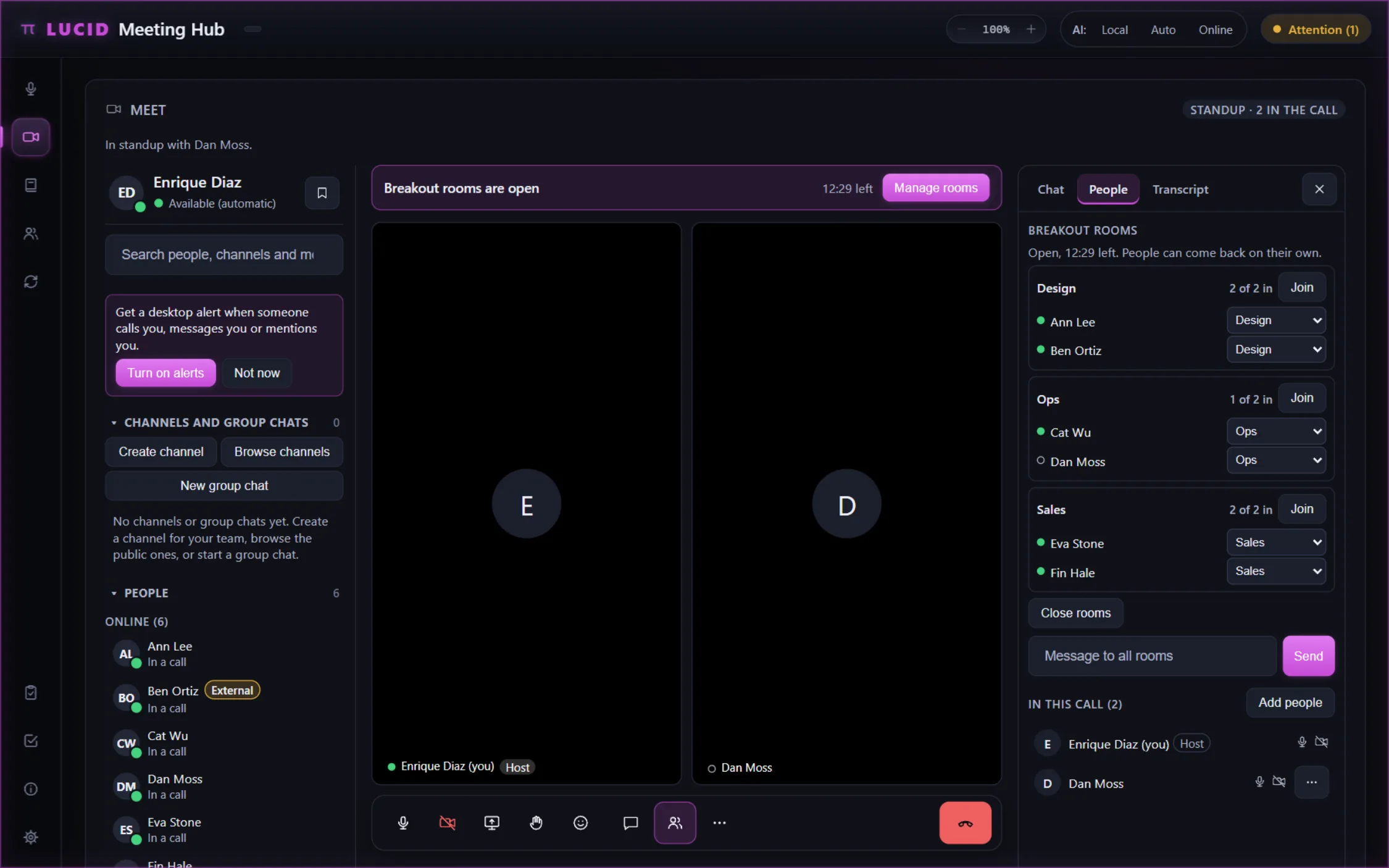
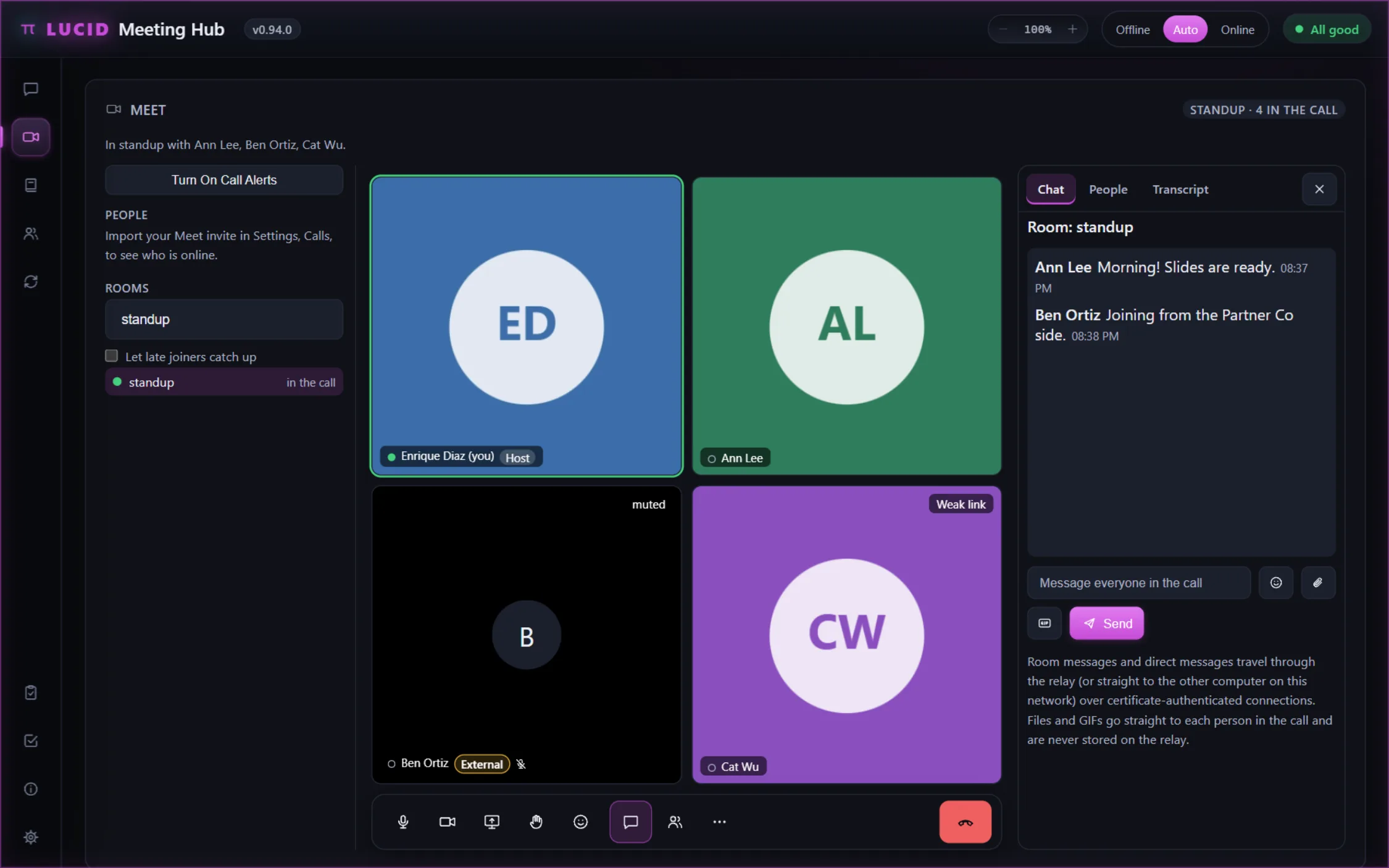
And it works with Microsoft Teams
Notes from your Teams meetings
Keep using Teams for meetings with other companies: the Hub records a Teams (or Zoom, Webex, Google Meet) meeting from your own computer's sound, with no bot in the call, and turns it into notes, decisions and action items in your encrypted vault.
Talk across during a move
The Teams bridge connects a Lucid channel or chat with a Teams channel or chat through your organization's own Azure bot, so people on both sides keep one conversation while a team moves over; files cross in channels and one-to-one chats. Both organizations' policies decide what may cross, and every message says where it came from. Built and tested in our lab; not yet run against a customer's Teams tenant.
| Question | Microsoft Teams | Lucid Meet |
|---|---|---|
| Where it runs | Microsoft's cloud | Relays your organization runs (or we run one just for you), with a standby that takes over by itself |
| Who holds the keys to messages and files | Microsoft manages them (customer-managed key options exist on some plans) | Your devices and your organization; the relay stores ciphertext it cannot read |
| When the internet or the server is gone | Teams needs Microsoft's cloud to send messages and hold calls | Own-network mode: messages and calls go on between desktop Hubs on the same network |
| Meeting notes and AI | In Microsoft's cloud | On your computer with local models by default; cloud models only if your organization allows them |
Teams is a trademark of Microsoft. Lucid Meet is not affiliated with Microsoft. A fuller comparison, including where Teams is ahead today, is available on request.
01 The briefing
Two films. One shows the real app; one is a concept.
Film 1 was filmed from the running application in an earlier build, the real interface, on a machine with no network, against a vault of simulated meetings. Nothing in it is a mockup, and the product has grown a great deal since: Lucid Meet calling and chat, the Admin Console and the relay failover described below are not in it. Film 2 is a roadmap concept, watermarked as such for its whole runtime. Some of what it imagines now ships in some form (turning a chat into a call, shedding video to keep the voices, captions sent as text over a failing link); the agent participant and the forward-deployed setting remain concept.
Invented people, invented units, invented meetings. No recording of any real person was used, and both films say so on screen.
Short cuts
Thirty seconds to two minutes each, cut from the same footage with the same labels: a short can never claim more than the long film it came from.
02 Who it is for
One product, six ways in.
The capture path, the vault and the encryption are the same for a guest on a borrowed laptop and for an agency inside its own boundary. What changes is what you install, who runs the relay, and how people sign in. The package names are working names, and nobody picks a package or a download: the invite from your organization (or, for a guest, the meeting link) already knows who you are and what your device needs.
Guest
Anyone invited to one meeting. The host sends a link; the guest opens it in any current browser, types a name, checks the camera and joins.
- Installs: nothing.
- Relay: the host's organization runs it.
- Sign-in: the typed name and email, shown “not verified”, unless the organization offers a verified sign-in.
- Works when the host's relay has guest links turned on.
Personal
One person, no company: a consultant, a freelancer, a student who is in six meetings a day and remembers none of them.
- Installs: the Hub on Windows or a Mac; an iPhone or Android phone if they like.
- Relay: none needed for meeting capture; in the limited release, the hosted Lucid Preview organization.
- Sign-in: a key on the device; a password account in the Preview organization.
Team
A family, club, small team or small business with no identity provider, that wants its own private chat and calls.
- Installs: the Hub, iPhone with Apple Watch, Android with Wear OS.
- Relay: TECHLEAD 187 runs one for the team, just for them.
- Sign-in: username and password; the admin approves each new device or lets them through automatically.
Business
A company on Entra, Google or Okta whose client, counsel or contract material cannot leave, and whose people still need to talk to partners on Teams or Slack.
- Installs: the same apps; members may also use the browser.
- Relay: TECHLEAD 187 runs it for the company, or the company runs it.
- Sign-in: single sign-on (OIDC, SAML) with SCIM provisioning.
Enterprise
A multi-site organization that runs its own servers and wants governance it holds itself.
- Installs: the same apps plus the server set: relay, media server, signer, Admin Console.
- Relay: the customer runs as many as it needs, licensed by relay count; today one relay is active at a time and a standby takes over automatically.
- Sign-in: SSO and SCIM, under the organization's own AI policy. The enterprise API is in development.
Government
Agencies, units, primes and enclaves where the collaboration tool must live inside the boundary and keep working when the link does not.
- Installs: the Hub and the server set, with the FIPS build of the relay; phones come later.
- Relay: the customer runs it, inside its boundary.
- Sign-in: the High compliance profile: passkeys or security keys for everyone, attested hardware keys for admins; own-network mode and government guest rules.
Where they diverge
| Package | What they install | Who runs the relay | Sign-in | How they get in |
|---|---|---|---|---|
| Guest | Nothing; a current browser | The host's organization | Guest link; typed name and email shown “not verified” | The meeting link the host sends |
| Personal | Hub on Windows or Mac; phone optional | Nobody, or the hosted Lucid Preview organization | Device key; password account in the Preview organization | Our invite into the Preview organization |
| Team | Hub, iPhone with Apple Watch, Android with Wear OS | TECHLEAD 187, one relay per team | Username and password, admin approves devices | The team admin's invite |
| Business | Same apps; members may use the browser | TECHLEAD 187, or the customer | SSO (OIDC, SAML) and SCIM | The admin's invite, then SSO |
| Enterprise | Same apps plus relay, media server, signer, Admin Console | The customer, as many relays as it licenses, with failover | SSO, SCIM, organization AI policy | A pilot run with us, then the customer's own invites |
| Government | Hub and server set, FIPS relay build; phones later | The customer, inside its boundary | High compliance profile, own-network mode | A pilot run with us; no public download reaches an enclave |
Three things are identical in every row: no telemetry, your content is never training data, and the encryption does not change with the package.
03 What ships today
What release 0.99.4 actually does.
One product with two halves: meeting intelligence with no bot on your own computer, and Lucid Meet, calling and chat your organization runs. Every card below is in the public release unless its label says otherwise.
Capture with no bot
On Windows the Hub notices a Teams, Zoom, Webex, Google Meet, Slack huddle or Discord meeting and records it from the computer's own sound (optionally from just that app), with your microphone if you choose. Slides and shared screens are captured and read by OCR. Nothing joins the call. On a Mac the Hub records in-room meetings and Lucid Meet calls.
Local transcription and notes
Whisper transcription on your machine (NVIDIA GPU or CPU on Windows, Apple's on-device models or MLX on a Mac), speaker identification, then a summary, decisions and owned action items written by a local model by default. Tasks can go to Microsoft To Do or Outlook Tasks.
Ask your meetings
Plain-language questions across every stored meeting, answered with the meetings cited. Pre-meeting briefs, questions aimed at you flagged live, weekly digests. The privacy setting that keeps Ask local outranks the model router.
An encrypted vault
Every meeting, key and secret sits in a local vault. Unlock it with Windows Hello on Windows or Touch ID on a Mac; your vault password always stays a way in. The Hub records while the vault is locked and asks for it only when you need it.
Lucid Meet chat and channels
Direct messages, group chats and public or private channels, end-to-end encrypted: threads, mentions, files, canvases, polls, reactions, presence, scheduled send, and notifications that say who and what.
Calls and large calls
Calls of up to 8 people go Hub to Hub, encrypted between the devices. From 9 people a call moves to a media server that forwards only encrypted frames, up to 100 by default. Screen sharing, captions from each person's own transcription, live translation, consent-gated recording.
Guests from a link
Guests join from the link their host sends, in any current browser, with nothing installed. They wait in the lobby; their email is a label marked “not verified” unless they sign in with a method the organization allows (Login.gov, Microsoft, Google, PIV or CAC). Government addresses need a verified sign-in.
Meeting tools
Scheduling with RSVP, lobby, host controls, whiteboard, breakout rooms, polls, spotlight and co-organizers, attendance reports, and remote control of a shared screen with consent each time (tested on Windows).
Admin Console
Served by the organization's own relay: people and devices, invites and approvals, seats, license, revocation, bridges, legal holds and logs, with a chained audit log. A Standard or High compliance profile and an optional two-person rule for sensitive changes.
SSO and SCIM
Sign-in with OIDC (Entra ID, Okta, Google, Ping) or SAML 2.0, bound to a key made on the device, with SCIM 2.0 to add and remove people. Organizations without an identity provider use username and password with admin approval. Proven in our lab; the first live customer tenant is part of a pilot.
Retention, legal hold, eDiscovery
Retention set by the organization's signed policy, legal holds that keep held messages past retention with a reason on every hold and release, and an eDiscovery archive the organization runs itself, off by default and visible as a member wherever it reads.
Bridges
Slack, Microsoft Teams and Google Chat users keep talking with Lucid people through a connector the organization runs, under a policy both organizations agree to. Bridged conversations are not end-to-end encrypted and say so. XMPP and IRC bridges are Available on request.
Own-network mode
When no relay answers, Hubs on the same network find each other with signed beacons only the organization's own certificate authority can vouch for, and keep messaging and calling Hub to Hub. The organization can extend it to up to 32 private networks it lists.
Multiple relays with failover
As many relays as the organization licenses, named in one relay list it signs. Today one relay is active at a time: when it stops answering, the apps move to the standby; chat, presence and push carry on, and calls follow the move, large calls included, with new call keys.
Phone numbers and dial-in
A person's own phone number rings their Hub, iPhone and Android phone, calls out from their line and sends texts. Every new meeting gets a dial-in number and a PIN; the call stays end-to-end encrypted until a phone caller joins, and then everyone sees that the audio no longer is. Phone audio is never end-to-end encrypted, and the apps say so.
Restore message keys between your devices
Any of your devices (Hub on Windows or Mac, iPhone, Android) sends its chat keys to another of yours, confirmed with a safety code, and a device that lost its store gets its earlier messages back. Nothing goes through the relay that it can open.
Support engineer
In System status, the “Support engineer” card reads the Hub's own checks and advises, and fixes only what you ask it to: putting your configured state back (reconnecting to the relay, for example) runs at once, and anything beyond restoring your settings waits for your approval. It uses your own API key or a local model and shows you any ticket before it goes to your organization's Admin Console.
04 Platforms
Desktop, phone, watch and browser.
The desktop Hub is the public release. The phone and watch apps are built and in testers' hands, not yet in the app stores. Lucid IDE is optional: the Hub runs on its own, and only subscription sign-in to AI models uses the IDE's engine.
| Platform | What you get | Status |
|---|---|---|
| Windows 10 and 11 | The full Hub: capture with no bot, local AI, vault, Lucid Meet. Installer signed by TECHLEAD 187 LLC; updates verified and installed only for the exact released version. | Shipped |
| Mac (Apple Silicon) | The Hub as a DMG or pkg: in-room meetings with Apple's on-device models, vault with Touch ID, Lucid Meet. Not yet notarized, so the first launch needs “Open Anyway”. Capturing another app's meeting audio is Windows only today. | Shipped |
| iPhone with Apple Watch | Encrypted chat, calls that ring like phone calls, large calls, in-room recording on the phone; the watch shows chats, replies and answers calls. Build 45 (0.99.4) on TestFlight; every Admin Console invite adds the person to the testers. | Available |
| Android with Wear OS | A full port of the iPhone and watch apps: encrypted chat, calls, meetings, notifications, password sign-in, relay failover. Build 9 (0.99.4) in Firebase App Distribution for invited testers and as an APK under Download; the Wear OS app is installed by hand for testers. | Available |
| Browser | Guests join meetings with nothing installed. Members of organizations with single sign-on can use chat, channels and calls when the organization turns it on. | Shipped |
| Browser, password-only organizations | Members of organizations that sign in with username and password cannot use the browser yet. | Roadmap |
| Linux desktop | A packaged Hub for Linux. (The relay and server set already run on Linux.) | Roadmap |
Download
Download Lucid Meeting Hub 0.99.4.
Anyone can install the apps. Meeting capture, transcription, notes and the encrypted vault work on their own. Lucid Meet (chat, channels, calls and phone numbers) signs in with an invite from your organization's Admin Console, or from us for the preview: request it. New in 0.99.4: people set up on different days verify each other again, so every message and call reaches everyone (install 0.99.4 on every device), and Android video calls ask for the camera. 0.99.3 stopped false recordings for a mail about a meeting and for Zoom's hourly updater; 0.99.2 brought phone numbers with calls and texts, dial-in by phone on every meeting (end-to-end encrypted until a phone caller joins) and presence other apps can read.
Windows 10 and 11
The full Hub, 64-bit. The installer is signed by TECHLEAD 187 LLC. 117 MB.
Mac with Apple Silicon
A DMG to drag into Applications (137 MB), or a pkg for managed installs (123 MB). Not yet notarized: on first launch open System Settings, Privacy & Security, and choose “Open Anyway”.
Android
Lucid Meet for Android phones, build 9. Open the file on the phone and allow installs from your browser when Android asks. 315 MB. Invited testers can also install it from Firebase App Distribution.
iPhone and Apple Watch
On TestFlight, build 45, by invitation: every Lucid Meet invite adds you as a tester, and Apple emails you the TestFlight link. There is no public download for iPhone until the App Store listing.
Source of the bundled media libraries
The Hub ships FFmpeg with the GPL encoders x264 and x265. Their complete corresponding source, as the licenses require. 89 MB.
Check what you downloaded
SHA-256
Windows 20be945c9d19273a1f1d38dd97d6352297097fc2f6523ab9865ade638bcd3b9b
DMG 7e5e5cd94d9289db9d98844f486ec9b627357a7e926e3b4917b60e6a34527b98
pkg 991c4666ebd014e4d979b0c6724c6af884e3e4b0045f53b32ce5ca5146fea64b
APK 2edd57aa426cb7d9d9578b5e763064f74e9cf113b47524c30ab05e3a602a76a6
Installed Hubs update themselves: each Hub asks its organization's relay for the current release and installs only that exact, signed version.
05 Local & small-hardware AI
It does not need your GPU, your account, or your network.
The Hub profiles the hardware and picks a model plan for it, including separate plans for plugged in, on battery and power saving. On a machine with no accelerator the pipeline runs on quantized CPU models: slower, and the app says so rather than quietly reaching for a cloud model to hide the wait.
The local path, end to end
- Transcription: faster-whisper, int8 on CPU, CUDA on a supported NVIDIA card; Apple's speech models or MLX Whisper on a Mac.
- Notes, decisions, Ask: Ollama on the box, chosen from a reviewed model catalog to fit your memory and a measured speed floor.
- Speaker identification: local voiceprints, saved only when you choose, never synced.
- Nothing egresses: with no provider connected, the product is still whole.
The privacy veto outranks the router
power.prefer_local and integration.allow_external_ask govern Ask regardless of what the model picker would prefer. When an external model is refused, the refusal is shown and the local model answers, and every saved meeting records which model wrote its notes.
An organization can set its own AI rules in its signed policy: which routes are allowed (this computer, its own AI servers, frontier models), which data may go where, allowed models and budgets.
And when there is a GPU, it uses it
CPU-only is the floor, not the target. The Hub takes the acceleration it finds: an NVIDIA card through CUDA, a recent AMD card through ROCm or Vulkan, or an Apple Silicon Mac's unified memory. The difference is large:
- Transcription goes from slower than real time on a thin CPU to comfortably faster than the meeting.
- A bigger local model becomes affordable, which shows directly in the quality of summaries, decisions and answers.
- Video capture uses the hardware encoder (NVENC, AMF or QuickSync) instead of the processor.
Nothing about the product requires it. The same build runs on an issued laptop with no accelerator, tells you which path it took, and never swaps in a cloud model to cover for the hardware.
Providers in the release
Every provider is off until you supply a key, a subscription sign-in, or a local endpoint. An organization that cannot use a vendor never enables it, and its signed policy can block it outright.
A CPU-bound laptop is a supported deployment, not a degraded one.
Small quantized models, longer waits, the same pipeline, and an interface that states which model ran and where. It is the configuration most people actually have. Give it a GPU and everything gets faster and better; take it away and nothing stops working.
Film 1, chapter “CPU-only”06 How it is secured
Security is the substrate, not a tier.
The cryptography does not change between a personal laptop and an enclave. What changes between packages is who runs the servers, where identity comes from, and how strict the sign-in rules are, never whether encryption is on.
Captured locally
Audio is taken from the session already playing on your machine. No service is trusted with it.
Fenced before a model
Spoken and on-screen text is fenced before any prompt, so a participant's words cannot pose as an instruction.
Sealed at rest
Vault master key wrapped with AES-256-GCM under PBKDF2-HMAC-SHA256 (600,000 iterations); data under Fernet.
Your own CA
Each device gets its own certificate from the organization's CA; every relay connection is mutual TLS; one device can be revoked alone.
End-to-end encrypted
Chat, mesh calls and large calls are encrypted on the device; the relay and media server carry ciphertext.
Nothing phones home
No telemetry and no meeting bot. Analytics are computed on the device and stay there.
Chat: contract CE-1
Each conversation has a random key per epoch, wrapped with ECDH P-384, HKDF-SHA-384 and AES-256-GCM only to devices verified against the organization's CA and revocation list. Each message is AES-256-GCM and signed by the sender's device. The relay cannot turn encryption off.
Calls, small and large
Calls of up to 8 people are DTLS-SRTP between devices, with fingerprints signed by each device key so a relay cannot swap them. Large calls encrypt every audio and video frame with AES-256-GCM on the sender's device; the media server forwards ciphertext only. Keys rotate as people join and leave.
Signed by the organization
Policies and the list of relays are signed by the organization's own CA; the apps refuse an unsigned relay list and pin the newest policy so it cannot be rolled back. The Hub's local API stays on this computer behind a host allow-list, and any change through it needs the window's own token.
FIPS, stated exactly
Chat and call encryption use FIPS-approved algorithms, and the FIPS build of the relay uses the AWS-LC FIPS module and refuses to start outside FIPS mode (Available on request). The modules on the Hub and phones are not validated modules. We hold no FIPS validation, FedRAMP, CMMC or HIPAA certification and do not claim one.
What the relay can still see
Metadata is not encrypted: who is in which call or conversation, when, display names and message sizes. Captions in calls of up to 8 people pass through the relay readable to its operator; in large calls they are encrypted. Bridged conversations are not end-to-end encrypted and are labeled. When someone joins from a browser, the call says the relay operator could read it.
Not post-quantum, yet
Chat and call keys use elliptic-curve agreement today. MLS (RFC 9420) for agreed membership and forward secrecy is on the roadmap. A lost device exposes its history until it is revoked, which is why one device can be revoked without touching the person's others.
07 No shared fate
Run the relay. Survive the relay.
An organization runs its own Lucid Meet relay because that is where control lives: directory, revocation, retention, legal hold and an audit log on its own servers. What a relay must never be is a single point of failure. When Teams goes down, an organization stops talking and waits for someone else's status page. Lucid walks down a ladder instead, and climbs back as soon as a higher rung answers.
The active relay
The relay named active in the organization's signed relay list carries chat, presence, push, calls and the media server for large calls.
ShippedThe standby relay, new in 0.99.0
When the active relay stops answering, the apps move to the one that answers as active. A call in progress rejoins the same room on the new relay by itself (“Reconnecting the call...”), large calls rejoin on the new relay's media server, and the call gets new keys. The apps retry every 3 seconds for up to 2 minutes.
ShippedNo relay answers: own-network mode
Hubs on the same network find each other with signed beacons and keep presence, direct messages, invitations, calls and file sends going, Hub to Hub over mutual TLS. Relay-kept history, large calls, bridges and guests wait for a relay to return.
Shipped · desktop HubsOther buildings, only if the organization lists them
A signed policy can extend own-network mode to up to 32 private networks, through multicast routing or anchor Hubs that pass beacons along. Nothing goes outside the listed networks.
ShippedTwelve people in a large call. The active relay goes away. Everyone is back on the standby's media server within 37 seconds.
That was a live drill in our own deployment, which has run an active relay and a standby since 2026-11-26: the lab node active, an Azure node standby. Nobody rejoined by hand; the call screen stayed up and said what it was doing.
Release 0.99.0, multi-relay phase 1Where your organization's availability comes from
| When this breaks | Teams / Slack | Lucid Meet |
|---|---|---|
| The vendor's cloud | Everyone stops. You read a status page. | Not in the path when the organization runs its own relays. |
| The active relay | n/a | The apps move to the standby; chat, presence and push carry on, and calls rejoin by themselves. |
| Every relay, or the internet link | Everyone stops. | Hubs on the same network keep messaging and calling in own-network mode; relay-kept history waits. |
| Everything at once | Email, phones, and a shadow tenant. | Meeting capture, transcription, notes and Ask keep running on each computer with local models. |
Still ahead and labeled as such: several relays active at once, one or more per region, that all talk to each other, so people use their local relay and any relay can take over for another, is Roadmap. Own-network mode runs on desktop Hubs, not on the phone apps.
08 Bridging what you already run
Bridge first. Replace only where you choose to.
Two organizations that both bought good tools often cannot work together, because the tools are destinations rather than protocols. Teams and Slack cannot exchange messages natively, so the work falls back to email or a personal device and the record is lost. Lucid works at all three rungs, and you pick the one that fits.
Use theirs
Keep holding meetings in Teams, Zoom, Webex or Google Meet; the Hub records them on Windows with no bot and no tenant permission, because nothing joins. Calendars from Outlook, Microsoft 365 and Google; tasks to Microsoft To Do or Outlook.
ShippedBridge theirs
A connector each organization runs with its own Slack, Microsoft or Google registration links a Lucid conversation with a Slack channel, a Teams chat or a Google Chat space. Both organizations' policies must agree on what crosses; refusals are shown and every crossing is audited without message text.
Shipped · XMPP and IRC Available on requestRun ours
Lucid Meet itself: end-to-end encrypted chat, channels and calls on the organization's own relays, with own-network mode when no relay answers.
Shipped“How do I collaborate with you if your org is on Teams and mine is on Slack?”
The blocker is usually policy, not technology. A bridge that keeps provenance, labels what is not end-to-end encrypted, and asks neither party to migrate is the shortest path from that sentence to a working conversation. The bridges have run in our lab; running them against a live customer workspace or tenant is part of a pilot.
Two organizations, two sanctioned tools, one conversation09 The agentic ecosystem
The Hub owns the conversation. The IDE, if you want it, owns the synthesis.
Lucid Meeting Hub and LUCID Agent IDE are two products from TECHLEAD 187 that share one contract. The Hub does not need the IDE: it runs on its own, and only subscription sign-in to AI models uses the IDE's engine. With the IDE installed, an agent can stand on the meeting record and do work, under a fail-closed gate that scans every tool call.
A read-only surface
/ext/meetings, /ext/todos, /ext/analytics, /ext/premeeting, behind a bearer token. The IDE reads the record; it cannot change the vault through this door. Notes can also be sent into the IDE's knowledge panel.
Sync with no server
Knowledge Sync (off by default) moves your records between your own Hubs through a folder you own, a NAS, a synced drive or a USB stick, as a signed, end-to-end encrypted journal (Ed25519, X25519, ChaCha20-Poly1305). Sharing with another person needs approval from both.
Shared model plumbing
With the IDE installed, the Hub can reach models through the IDE's bundled engine instead of duplicating credentials, and checks that coupling on startup so an IDE update cannot silently change behavior.
Why the ecosystem matters
An agent that can only read your code is guessing about your intent. The intent was stated out loud, in a meeting. Close that loop and the agent stops guessing:
- A decision made at 0930 becomes a scheduled change at 0935, with the meeting it came from cited.
- The brief for your next meeting is assembled from what the record already knows.
- Every saved meeting records which model wrote its notes, so a reviewer can see what came from where.
- The same posture on both sides: untrusted text is fenced, and silence is a deny.
Is the IDE required?
No. The Hub standalone is a complete meeting-record, chat and calling product. The IDE adds the agentic workspace, cross-app recall and subscription sign-in to AI models. A government user who cannot get the IDE approved still gets the whole Hub.
10 What comes next
Built and waiting, and still to build.
In development means built and passing our tests, not yet in a release. Roadmap means designed or proposed, not built. We give no dates for either; a thing is shipped when it is in a public release.
In development
Organization branding
The organization's name, logo, accent and welcome text on the guest page and the members' web client; the standard Lucid theme when no brand is set.
Themes on iPhone and Android
The Lucid IDE's 23 themes, with a picker.
Presence for integrations
Availability, activity and out of office, like Teams and Outlook, readable and settable by the organization's own tools through the API. The apps show it since 0.99.2; the relay side is built and not yet deployed.
Enterprise API: monitoring, audit, SIEM export
Health, capacity and a signed audit feed for the organization's own tools, with export to SIEM platforms.
Join links on join.lucidmeetinghub.com
This site already lives on lucidmeetinghub.com; meeting join links move to join.lucidmeetinghub.com.
Roadmap
Organization licensing
Seat tokens issued by the organization's own relay and checked offline by the apps. No device calls Lucid on a timer.
Email change, a second factor, and the browser for password accounts
Email change and a second factor for username and password accounts, and browser sign-in for organizations without an identity provider.
Chat key recovery, the rest
Every key also wrapped to the sending device, a sealed key backup the relay cannot open, and detection of a lost key store.
A Lucid agent in meetings that answers and builds
A proposal in review: an announced, labeled participant whose output carries provenance.
Active relays in every region
Several relays active at once, one or more per region, all talking to each other: people use their local relay, conversations and calls cross regions, and any relay takes over for another. When a home relay fails, apps move to the next relay of their region, then the next region. The license sets how many relays an organization runs. Never another organization's relay.
Enterprise API, later phases
Compliance exports, SCIM under API governance, events and webhooks, agent integrations, and ticketing platforms such as ServiceNow and Jira.
Store listings and managed installs
App Store, Google Play and Microsoft Store listings; a Windows MSI with ADMX templates; a notarized Mac pkg with an MDM profile; an offline bundle with an SBOM for air-gapped sites.
Your feedback is recorded verbatim, with your name on it, and answered rather than absorbed.
11 Who built it
Built by soldiers, for the person on the worst link.
We are not a start-up that surveyed the problem. We are two soldiers who have sat in the meeting that could not happen, on the network that would not carry it, under a policy that would not allow the tool, and then went and built the thing we wanted issued to us.
Enrique Mertins
Soldier · creator, Lucid Meeting HubWrote the product in Film 1: the capture path that needs no bot, the encrypted vault and its key hierarchy, the single-screen interface, the local model routing that survives a machine with no accelerator, and the signed journal that moves a meeting record between machines with no server anywhere in the middle.
The design bias is deliberate and comes from the uniform: the first user in every argument is the one on a degraded link, on a locked-down laptop, with no route to anybody's tenant.
Nick Chadwick
Soldier · creator, LUCID Agent IDE · TECHLEAD 187 LLCBuilt the agentic development environment this product was written inside, the security-first harness that scans every action an AI agent takes, keeps provenance on what it produced, and is built so leadership can actually approve AI-assisted work rather than ban it.
On this program he holds the approval lens: whether a capability can clear policy, survive an assessor, and be fielded, because a capability nobody is allowed to install is not a capability.
How two people built this much
Agentic development, gated
The work is done with AI agents inside a harness that scans every action before it runs and fails closed on anything it cannot verify. Speed comes from the gate, not from skipping it: nothing lands without passing its checks.
Provenance on the work itself
Which model wrote which lines is tracked, the same way the product tracks which model wrote which note. If we would not accept unattributed AI output in your meeting record, we do not accept it in our own source.
Nothing presented as done that is not
The rule we work to: no stub presented as finished, no mocked state presented as live verification. That is why every item on this page carries its status, and why the concept films are labeled as concepts instead of demoed as product.
The product tells the truth about its own state, because the team is built that way first.
Honest degradation is not a feature we added late. It is the same discipline we hold ourselves to while building it: name the gap, label the unverified, and never let a demo imply a capability that will not be there in a pilot.
The working agreement behind both products12 Limited release
Request the preview.
Anyone can download Lucid Meeting Hub 0.99.4; Lucid Meet is in limited release, by invitation. Tell us who you are, which package fits, and which devices you use. If it is a fit, the invite comes from an Admin Console: its page offers the right download for your device and signs the app in.
1. Write to us
One email to TECHLEAD 187 LLC with your organization, the package that fits (Personal, Team, Business, Enterprise or Government), the devices you use and how many people.
2. Get an invite
Personal people join a hosted preview organization; teams get their own relay; Enterprise and Government start with a pilot we run with you.
Guests need none of this
To join one meeting, open the link your host sends. It opens in your browser with nothing to install. There is no public guest page to visit first.
The email goes from your own mail app to TECHLEAD 187; this site has no form and sets no cookies. Cloudflare, which serves it, counts page views without cookies (Cloudflare Web Analytics); the product itself sends no telemetry. Pricing is not published; pilots and pricing go through TECHLEAD 187.
13 Questions we expect
Straight answers, including the uncomfortable ones.
Does a bot join our meetings?
How does a guest join?
What happens when our relay goes down?
Can it run with no internet at all?
Do we need Lucid IDE?
Does it work on a Mac and on phones?
We cannot use Anthropic. Is that a problem?
Is it FIPS validated? Is it accredited?
How is this different from a meeting-notes SaaS?
What can I use today, and what is still ahead?
What does it cost?
Who supports it if we pilot it?
Your meetings, your relays, your record.
Read what ships, argue with what comes next, and ask for an invite. The most useful thing you can tell us is the constraint that blocks you today.